


aha, und womit hast Du die KML in eine GPX umgewandelt?
Beiträge von freeday
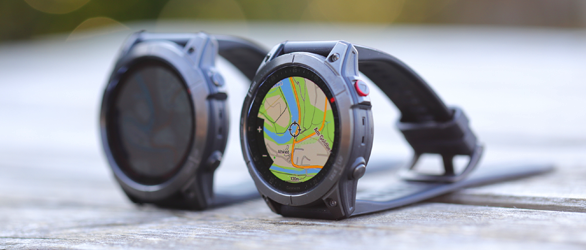
Garmin fenix 7X und epix Gen 2 im Test
Der Schwerpunkt dieses Tests und Vergleichs der Garmin Fenix 7X Solar und Garmin Epix Gen 2 liegt auf den Sensoren wie Höhenmesser, Positionsbestimmung und Herzfrequenz. Was unterscheidet die beiden GPS-Outdoor-Smartwatches? Und wie gut ist die Taschenlampe der Fenix 7X für den Outdoorbereich?
Hier geht es zum Test der Outdoor-Smartwatches ...
-
-
Hallo Anton!
die KML hab ich ja bereits herausbekommen.
aber beim Umwandeln in eine GPX, damit es MS lesen kann hab ich die Probleme. In der GPX steht nix drinnen
-
würde gerne die Strecke (+Wegpunkte) als GPX abspeichern.
http://maps.google.at/maps/ms?….291824&z=11&source=embedLeider gelingt es mir nicht die KML so zu konvertieren, daß danach bei der GPX lesbare Daten rauskommen (gpsbabel, gpsies, kml2gpx u.a. scheitern..)
Wer kann mir auf die Sprünge helfen damit ich es in MS ansehen kann.
Stehe wohl im Moment auf der Leitung - Danke -
Falls das Du sein solltest musst Du mal die Signatur zum Service schicken
-
Hallo Zusammen,
als ich meinen ersten Aventura von TT bekam, hatte der auch diese sternförmigen Risse unter der Schraube. Ich reklamierte bei TT und erhielt einen neuen Batteriedeckel, der nicht sternförmig gerissen war.
Ich hatte dann eine defekte Ladeelektronik, reklamierte bei TT, erhielt ein anderes Gerät von TT und dies war, man höre und staune, unter der Schraube sternförmig gerissen. Dieses Gerät habe ich nicht mehr reklamiert, weils mir zu blöd wurde und ich wollte das Teil ja auch mal nutzen. Im E-Mail-Verkehr mit Ralf Bögel habe ich jedoch deutlich geschrieben, dass da irgendwo in der Produktionskette ein totaler Grobmotoriker sitzen muss, in Honkong, Spanien oder Niedereschach.Wo genau, da könnt ihr euch ja eure eigene Theorie aufstellen!:p
Hallo Michael!Kannst ja mal in der Umfrage korrigieren - Danke.
http://www.naviboard.de/vb/sho…php?p=344221&postcount=21 -
User des Satmap können ihr Gerät updaten. Dadurch soll es u.a. weniger Stromverbrauch haben, Rotlicht, schnellerer Fix und andere nette Features...
http://www.satmap.com/software.php
Vielleicht kann ein Besitzer sagen, was die aktuelle 1.430 von der 1.400 unterscheidet - Danke
Changes in version 1.400
Customers will experience the following differences with v1.4 ontop of the changes in v1.328:
General Update
- New Splash Screen
Status Bar
- Small Battery Icon
- Improved Power Metering - Optimised for Lithium Primaries and LiPol Rechargeables
- Run / Stop Icon for Statistics Log
- Toggle Icon - When alternate mapping is available.
- WAAS/EGNOS Enabled - GPS Icon turns blue - Selective availability : WAAS (USA) - EGNOS (Europe)
GPS Map Page
- Track Up (Low Centre Spot) - Blue spot lowered option to allow more mapping to be seen ahead. Only 2 data boxes allowable to show max mapping.
- Toggle Function (Top Left Button). New concept of toggle maps. Satmap now has the ability to issue different map "types". For example Aerial coverage can toggle to A-Z mapping, that then toggles to CAA mapping, and then toggles back to Base mapping (typically 1:50k or 1:25k). When an alternate map is available the status bar icon will show. On switchover, the name or type of the new map will briefly show (i.e. "Aerial", "A-Z" or "Base Maps")
- Better handling of co-incident points - i.e. a waypoint on a POI (list box now appears) - allowing the POSITION INFO screen to be always accessed.
Large Map Areas / Aerial
- Better supported: Map packs treated in handy bite size - to effectively allow unlimited mapping to be used (limited currently by 32GB SD card size)
- JPG tile format now supported - leading to better handling of very large / hi res aerial imagery.
Planning Screen
- Distance measurement tools improved. Using the Set Marker function (joystick press whilst in Planning Map) it is now possible to measure distance and bearing (either Mag. or Grid) between any 2 points. Previously users could only measure from their own location.
Position Info Screen
- Lat/Long (DD MM.DDD) and any other supported Grid Ref system can be display simultaneously (E.G UTM or MRGS)
Hibernate (on the latest Platforms (09.02.15 and higher)
- Effectively a Stand By mode - default set at 2 hours (during which time the satellite data is saved (ephemeris and almanac) - so unit does NOT take 20 seconds to load Windows, and does NOT take 1:30 to get satellite lock. Typical lock time out of hibernate : 3-10 seconds. Essentially this means that the useful battery life can be extended by switching on for a quick lock - and then switch off. Note: logging and snail trail does NOT occur during hibernate.
- Hibernate timeout added to Advanced Power Control (0-8 hours)
Screen Capture
- On backlight boost button - now saves a jpg of the screen display (with date time stamp to a. SD card, or b. Flash if no SD card available). Press the Back Light button for 2 seconds and a camera icon appears on the status bar to indicate that a screen shot has been captured.
Settings
- More options to set target speed
- Memory Status : More detailed and clearer information about memory usage (SD Card, Flash and RAM). Low memory exclamation mark added in Memory Status area.
- Backlight - many more low settings (1,2,4,6,8.10,20,30% etc) - to protect night vision.
- Red Backlight - also to protect night vision.
Data
- Moon Phases added for Data boxes.
Datum Support
- Enhanced: New maps and datums now self-contained on SD cards, so they will plug and play without the need for fresh software updates for new countries.
Routes
- Routes Menu tidied up - functions now on buttons - list is for actual routes only.
- Folder concept now supported
- Better handling of very large routes and high numbers of waypoints. More strict filtering to restrict on required waypoints to be displayed.
- Invisible / Inactive routes now do not load in memory at all.
- Inactive routes can be set to show only "SP" - start point - allowing many more routes to be loaded.
- Better track to trail convert - better filtering to retain fewest WPs but best shape.
- Better visibility of active routes - the current leg contains blue arrows and has a blue border.
POIs
- Warning radius increased to 3km (i.e. total diameter 6km) - and red hatched for warning purposes.
- POI-Set by Postcode now available (for the UK units with Postcode data).
- POI-Set by Co-ordinate added.
- Enhanced support for Geocaching.com data (i.e. full hints and geocache log are supported)
- Folder concept supported.
- POI Icon selection - extending to spots, geocaching and other common symbols
SatSYNC 1.4
- Folder manipulation on both the Internal Storage and SD Card available on units with platform 09.02.21 or higher.
- Imported Routes and POIs now available immediately in their respective menus without the need to restart the unit (platform 09.02.15 or higher)
World Map
- Routes and POIs display more accurately now.
TRIP LOG Screen
- Buttons rearranged for more function and clarity.
Power
- During Critical Battery shut down - unit will now be revived if connected to external power - previously it would always shut down.
- Battery fully charged Icon now supported (previously not available)
AND - Bug Fixes. -
GPS SW Version 0.00 kann man normalerweise selber reparieren - einfach den Webupdater drüberlaufen lassen.
wird im Netz mehrmals darüber geschrieben.
z.B.: hier:
The symptoms to trigger it haven't been entirely easy to reproduce, but there's been some speculation that it's related to messing with the backlight while the unit is powering up. If MENU > MENU > Setup > ENTR > System > ENTR > MENU >Software Version > ENTR shows a GPS SW version of 0.00, you may either return your unit for (potentially out of warranty) "repair" or run WebUpdateer multiple times - people report 3-4 times being the norm - until the GPS firmware gets successfully flashed to the unit.
Quelle: http://www.gpsfaqs.org/faqs/ga…eries/gvistacx/Usage.html -
Zuerst schau mal ob die GPS-Firmware und Software-Firmware passt.
Dann mach mal einen richtigen Reset
https://forum.garmin.de/showthread.php?t=1506 -
Hallo Gert!
Ich hätte das auf den Wecker gehen unter Anführungszeichen schreiben sollen.
Du kannst selber ein Ticket erstellen oder es im englischen CompeBoard schreiben.
Hier bringt es was zur Diskussion untereinander aber Compe nimmt davon keine Notiz.Per Ticket freuen sich Compe über jeden Verbesserungsvorschlag, aber es wird nur ein Teil umgesetzt, da die Katalonen das Gerät scheinbar anders verwenden.
Als Beispiel möchte ich nur den Vollbildmodus nennen - ist denen einfach nicht wichtig, was für mich absolut unbegreiflich ist. Hier wird wertvolle Bildfläche für einen Kompass verschenkt der z.B.: bei schräger Montage am Kajak oder Rad sowieso falsch anzeigt. Dafür wäre es besser mehr von der Karte zu sehen. -
>>Vielleicht hat ja der eine oder andere auch die Muße, das CompeLand Team gelegentlich mal freundlich darauf hinzuweisen,....
Und warum willst Du nicht den Katalanen damit auf den Wecker gehen, Gert?
-
verstecken kann man auch ohne Attribut (.RTMAP)- oder kann das die Tablette nicht.
-
Ich würde als Finder aber nicht anrufen - wer zahlt das Auslandsgespräch - email wäre für mich als Finder ideal, wenn es denn schon anonym sein muss.
Eigentlich irre was man schon befürchten muss, wenn wo der eigene Name (Adresse) steht....
-
Wohl gemerkt.
Die OSM sind dann RASTER und nicht Vektor !! -
Variotek zähle ich nicht zum Compe-Team. Die sind u.a. Deutschland-Vertretung. Habe noch nie gehört, daß ein Problem hier im Forum von Variotek aufgegriffen wurde und von Compe entsprechend reagiert wird.
Und daß Pascal mitliest ist mir neu. Umso verwunderlicher, daß es auf das Naviboard-Forum eigentlich keine Reaktion von Compe gibt. -
-
Leute von Compe lesen hier nicht mit. Da kann keiner Deutsch. Die lesen auch nur im eigenen Forum quer und nicht richtig mit.
Trackaufzeichnung starten, pausieren, stoppen udn speichern geht ja - lies in aller Ruhe mal das Manual und probier mal die Funktionen durch.
Was stört genau an "dicker Punkt" + "II"? -
>>Wenn ich eine Wegpunktdatei aktiv(Haken gesetzt)habe, meinen Sportiva ausschalte + wieder einschalte ist diese immer noch aktiv.
Beim mir mit dem Aventura leider nicht. - Neu eingeschaltet und Wegpunkt erstellt wird immer eine neue Wegpunktdatei erstellt was sch... ist.
-
Hallo Gerd!
Welche Version ist derzeit am besten für MPVF?
Ich bleibe bei RMAP-Erstellung derzeit auf 6.8.8k
-
Komisch daß sich da Aventura und Sportiva ähnlich verhalten.
@Werner
>>die OS-Version weiß ich nicht; wie fragt man die ab?
Beim A geht es über Setting-System-About -
>>Ist noch keine Wegpunktdatei aktiv, wird eine neue angelegt.
Was mich nervt, daß nicht automatisch die letzte Wegpunktdatei aktiv ist.
Ich muss immer nach dem Einschalten eine Wegpunktdatei aktivieren.
Gibt es da einen Trick?